Description
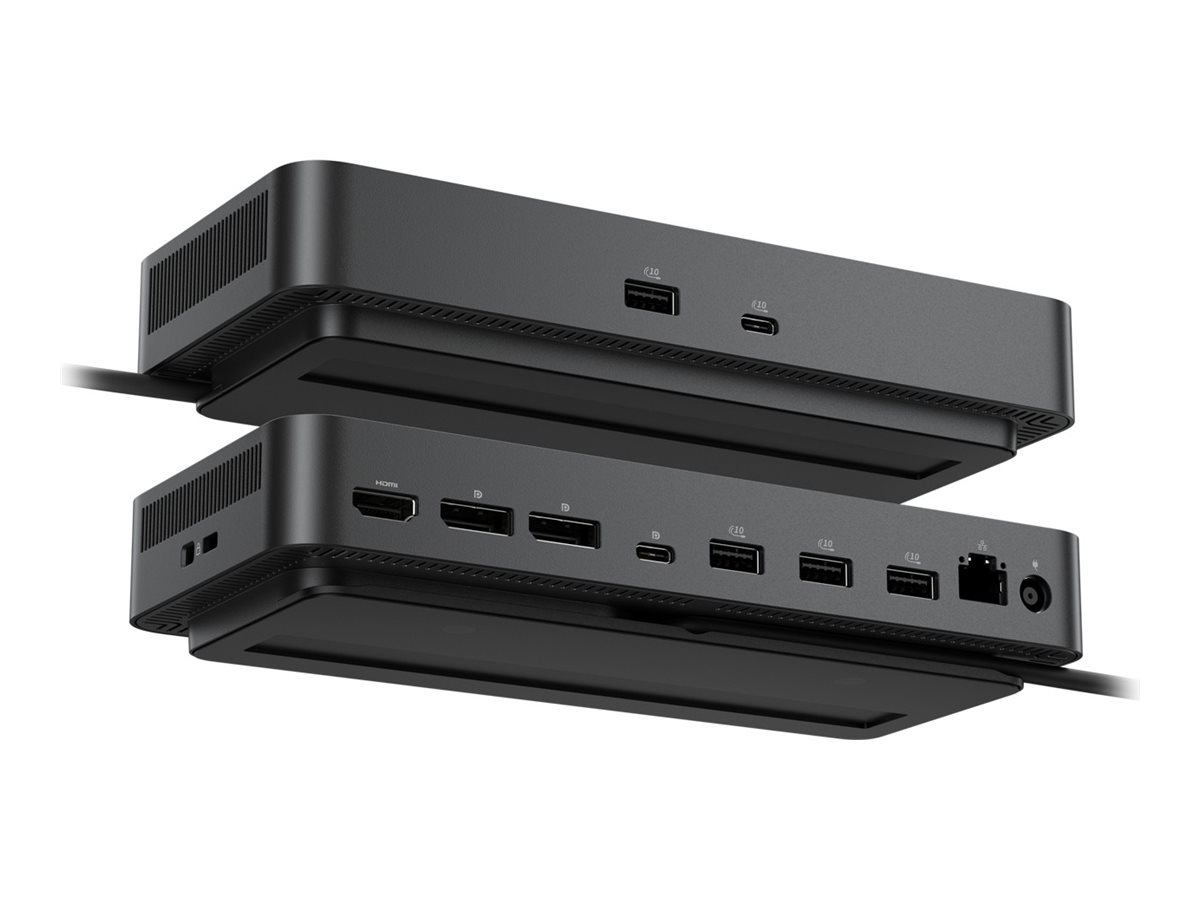
The Dell Pro Smart Dock SD25 provides seamless connectivity for any workspace with its integrated USB-C cable and compact form factor. This docking station supports dual display outputs with resolutions up to 6K, making it suitable for high-resolution tasks and enhancing productivity. Equipped with various interfaces including HDMI, DisplayPort, and USB 3.2 Gen 2, it ensures compatibility with a wide range of devices while delivering reliable power of up to 130 W for Dell systems and 96 W for non-Dell systems.
Additional features like wake on LAN, MAC address pass-through, and remote firmware updates enhance usability and security. The dock’s 90 cm cable length provides flexible placement options, while its robust security features safeguard devices. With multiple LED indicators and support for remote IT management, the Dell Pro Smart Dock SD25 is a versatile solution for any professional environment.
- Supports dual displays with resolutions up to 6K
- Delivers 130 W power to Dell systems and 96 W to non-Dell systems
- Features wake on LAN and remote firmware updates
- Includes multiple ports for versatile connectivity
- Compact design with a 90 cm integrated cable
- Flexible connectivity
Equipped with a variety of interfaces such as HDMI, DisplayPort, and USB 3.2 Gen 2, providing multiple connectivity options for different devices. - High resolution support
Capable of handling resolutions up to 6K, ensuring crisp visuals for both single and dual display setups, suitable for demanding workflows. - Reliable power delivery
Offers 130 W power delivery for Dell systems and 96 W for other devices, with an efficient power adapter ensuring smooth operation. - Enhanced security features
Built-in security measures including a Noble Wedge security slot and MAC address pass-through to protect connected devices. - User-friendly interfaces
Includes three LED indicators for easy monitoring and support for remote IT management, streamlining operational efficiency.
Main Specifications
Product Description | Dell Pro Smart Dock SD25 – docking station – USB-C – HDMI, 2 x DP, USB-C – 1GbE, 2.5GbE |
Product Type | Docking station |
Docking Interface | USB-C |
Video Interfaces | HDMI, 2 x DP, USB-C |
Dimensions (WxDxH) | 20.5 cm x 9 cm x 3.525 cm |
Weight | 562 g |
Networking | Gigabit Ethernet, 2.5 Gigabit Ethernet |
Power | Power adapter AC 100-240 V (50 – 60 Hz) 180 Watt Power Provided (19.5 V) |
Bundled Services | 3 years Basic Hardware Service with Advanced Exchange |
Extended Specifications
Environmental Parameters
Min Operating Temperature | 0 °C |
|---|
Max Operating Temperature | 35 °C |
|---|
Power
Power Device | Power adapter |
|---|
General
Power
General
Product Type | Docking station |
|---|
Power
General
Weight | 562 g |
|---|
Height | 3.525 cm |
|---|
Miscellaneous
Compliant Standards | DisplayPort 1.4 |
|---|
Networking
Data Link Protocol | Ethernet, Fast Ethernet, Gigabit Ethernet, 2.5 Gigabit Ethernet |
|---|
Power
Voltage Required | AC 100-240 V (50 – 60 Hz) |
|---|
Miscellaneous
Security Slot Type | Noble Wedge security slot / Kensington security slot |
|---|
Video
Max Resolution Details | 4K – 60 Hz (Quad Display)
5K – 60 Hz (Dual Display)
6K – 60 Hz (Single Display) |
|---|
Expansion / Connectivity
Interfaces | 2 x display / video – DisplayPort – 20 pin DisplayPort (1.4)
1 x display / video – HDMI – 19 pin HDMI Type A
1 x USB-C 3.2 Gen 2/DisplayPort 1.4 – 24 pin USB-C
1 x USB-C 3.2 Gen 2 – 24 pin USB-C
4 x USB 3.2 Gen 2 – 9 pin USB Type A
1 x network – 2.5G Gigabit Ethernet – RJ-45 |
|---|
Miscellaneous
Cables Included | 1 x USB-C cable – integrated – 90 cm |
|---|
System Requirements
OS Required | Ubuntu 24.04, Red Hat Enterprise Linux, Google Chrome OS, Windows 10, Windows 11 |
|---|
Miscellaneous
Features | Preboot Execution Environment (PXE) support, Kernel Direct Memory Access (DMA) protection, 130W power delivery to Dell systems, 96W power delivery to non-Dell systems, 3 LED indicators, wake on LAN, MAC address pass-through, security lock slot (cable lock sold separately), Dell Power Button Sync, remote firmware updates without a PC, Remote IT management |
|---|
Only logged in customers who have purchased this product may leave a review.


Reviews
There are no reviews yet.