
Dell Pro Dock WD25, Docking station, USB-C, HDMI, 2 x DP, USB-C, 1GbE, 2.5GbE, 130 Watt, with 3 years Basic Hardware Service with Advanced Exchange
$279.17 inc GST
✓ In Stock - 242 available
✓ Free NZ Delivery
242 in stock
- Allow 1–2 days for delivery to the North Island
- Allow 2–3 days for delivery to the South Island
- Add 1–2 days if you are rural
- Collection can be arranged

We are currently experiencing 1-2 day shipping delays from this supplier warehouse
Description
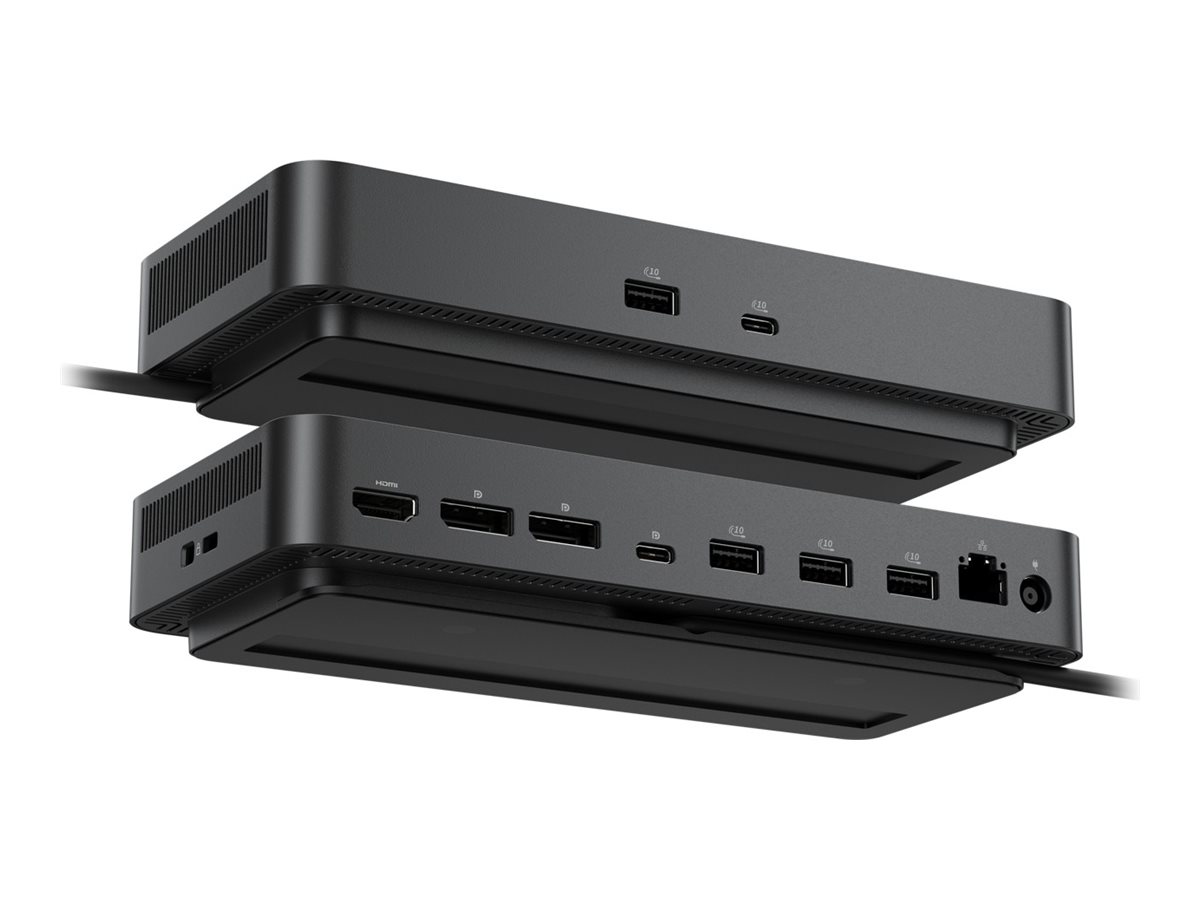
The Dell Pro Dock WD25 is designed to enhance connectivity and productivity, featuring a variety of interfaces including USB-C 3.2 Gen 2, HDMI, and DisplayPort. This docking station supports dual display output with resolutions up to 6K, allowing for seamless multitasking across multiple screens. Integrated LED indicators make it easy to monitor connections, while the device also supports features like wake on LAN and MAC address pass-through for added convenience and security. Equipped with a 130 watts power adapter, the dock delivers 100 W to Dell systems and 96 W to non-Dell systems, providing ample power for connected devices. The compact 90 cm USB-C cable ensures a tidy setup, and the docking station operates efficiently within a temperature range of 0°C to 35°C. Its robust networking options include 2.5G Gigabit Ethernet for faster data transfer, making the Dell Pro Dock WD25 an essential accessory for productive work environments.
- Supports dual display output with resolutions up to 6K
- Includes multiple connectivity options with USB-C, HDMI, and DisplayPort
- Provides 130 W power delivery for Dell and non-Dell systems
- Features wake on LAN and MAC address pass-through
- Compact design with a 90 cm integrated USB-C cable
- Versatile connectivity
The docking station offers various interfaces including USB 3.2 Gen 2, 2.5G Gigabit Ethernet, HDMI, and DisplayPort, ensuring compatibility with numerous devices. - High-resolution support
With support for resolutions up to 6K, this dock allows users to enjoy crisp visuals across dual displays, enhancing productivity and viewing experience. - Powerful charging capabilities
Designed to deliver up to 100 W power to Dell systems and 96 W to other devices, providing efficient charging through the single cable connection. - Enhanced security features
Incorporates a Noble Wedge security slot and Kensington security slot to protect the docking station, ensuring it remains secure and connected in any setting. - Compact and easy to use
Integrated with a 90 cm USB-C cable, the docking station offers a streamlined setup that minimizes cable clutter while maximizing functionality.
Main Specifications
Product Description | Dell Pro Dock WD25 – docking station – USB-C – HDMI, 2 x DP, USB-C – 1GbE, 2.5GbE |
Product Type | Docking station |
Docking Interface | USB-C |
Video Interfaces | HDMI, 2 x DP, USB-C |
Dimensions (WxDxH) | 20.5 cm x 9 cm x 3.5 cm |
Weight | 550 g |
Networking | Gigabit Ethernet, 2.5 Gigabit Ethernet |
Power | Power adapter AC 100-240 V (50 – 60 Hz) 130 Watt Power Provided (19.5 V) |
Bundled Services | 3 years Basic Hardware Service with Advanced Exchange |
Extended Specifications
General
Product Type | Docking station |
|---|---|
Width | 20.5 cm |
Depth | 9 cm |
Height | 3.5 cm |
Weight | 550 g |
Video
Max Resolution Details | 4K – 60 Hz (Quad Display) 5K – 60 Hz (Dual Display) 6K – 60 Hz (Single Display) |
|---|
Networking
Data Link Protocol | Ethernet, Fast Ethernet, Gigabit Ethernet, 2.5 Gigabit Ethernet |
|---|
Expansion / Connectivity
Interfaces | 2 x display / video – DisplayPort – 20 pin DisplayPort (1.4) 1 x display / video – HDMI – 19 pin HDMI Type A 1 x USB-C 3.2 Gen 2/DisplayPort 1.4 – 24 pin USB-C 1 x USB-C 3.2 Gen 2 – 24 pin USB-C 4 x USB 3.2 Gen 2 – 9 pin USB Type A 1 x network – 2.5G Gigabit Ethernet – RJ-45 |
|---|
Miscellaneous
Cables Included | 1 x USB-C cable – integrated – 90 cm |
|---|---|
Features | Preboot Execution Environment (PXE) support, Kernel Direct Memory Access (DMA) protection, 100W power delivery to Dell systems, 96W power delivery to non-Dell systems, 2 LED indicators, wake on LAN, MAC address pass-through, security lock slot (cable lock sold separately), Dell Power Button Sync |
Security Slot Type | Noble Wedge security slot / Kensington security slot |
Compliant Standards | DisplayPort 1.4 |
Power
Power Device | Power adapter |
|---|---|
Voltage Required | AC 100-240 V (50 – 60 Hz) |
Power Provided | 130 Watt |
Voltage Provided | 19.5 V |
System Requirements
OS Required | Ubuntu 24.04, Red Hat Enterprise Linux, Google Chrome OS, Windows 10, Windows 11 |
|---|
Environmental Parameters
Min Operating Temperature | 0 °C |
|---|---|
Max Operating Temperature | 35 °C |
Additional information
| Product Category | |
|---|---|
| Colour | |
| Manufacturer |
Only logged in customers who have purchased this product may leave a review.
Reviews
There are no reviews yet.